Switching to QUIC.cloud DNS
QUIC.cloud provides its DNS solution free of charge to its users. It allows you to use your root domain with QUIC.cloud CDN, if you wish. If you want to know more before you switch, check out our blog post introducing QUIC.cloud DNS.
Import existing DNS records to QUIC.cloud
Making QUIC.cloud your DNS provider takes only a few steps:
- From your QUIC.cloud dashboard, click DNS Zones in the top menu.
- Click +Add New Domain to DNS Zones.
- Enter your domain name and press Add Domain.
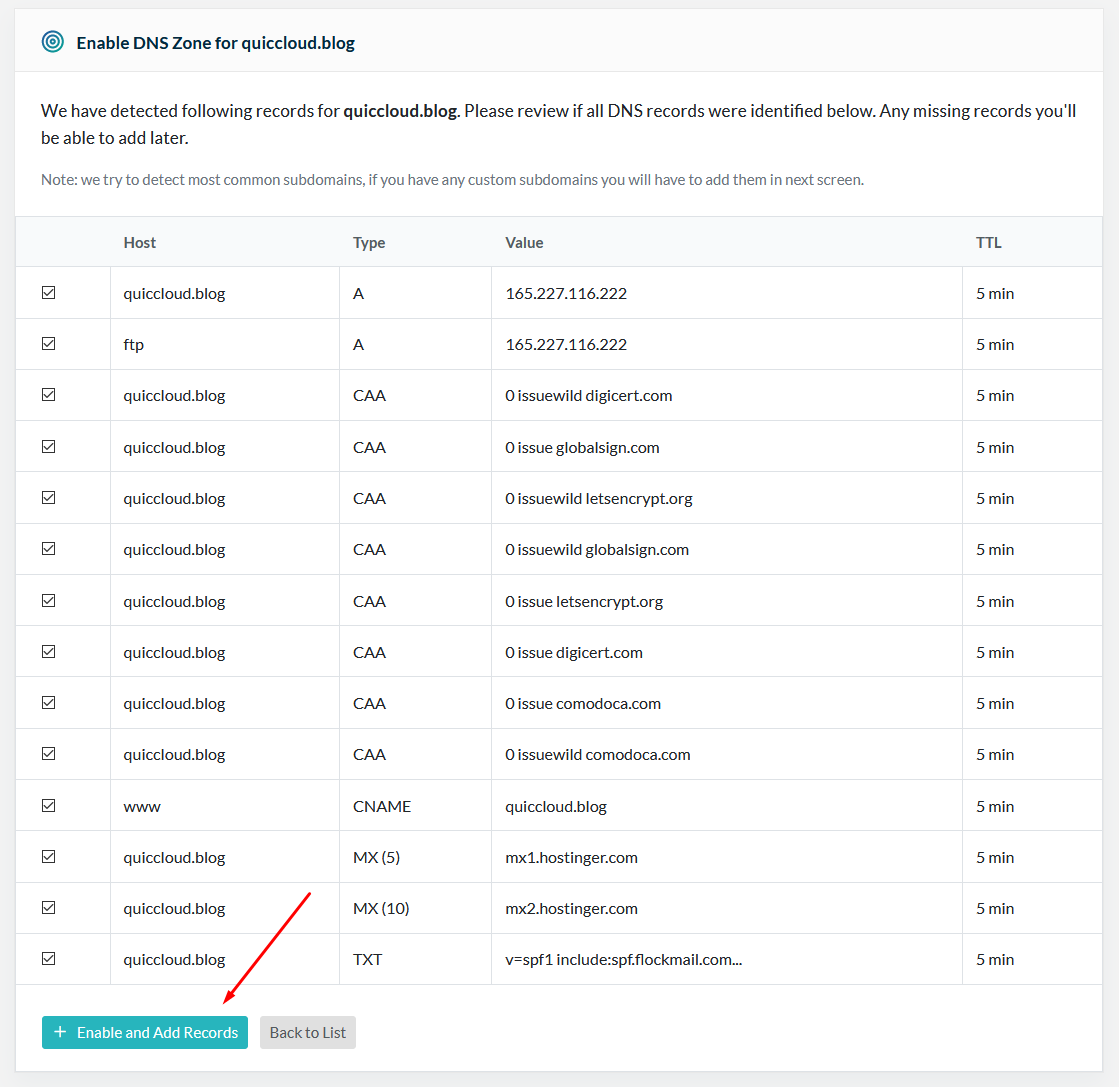
QUIC.cloud will attempt to detect your current DNS records. This may take a few minutes. Once detection is complete, you will be asked to confirm that your DNS information is correct. Accept all the detected records, or uncheck any that you no longer need, and click + Enable and Add Records.
Update your nameservers
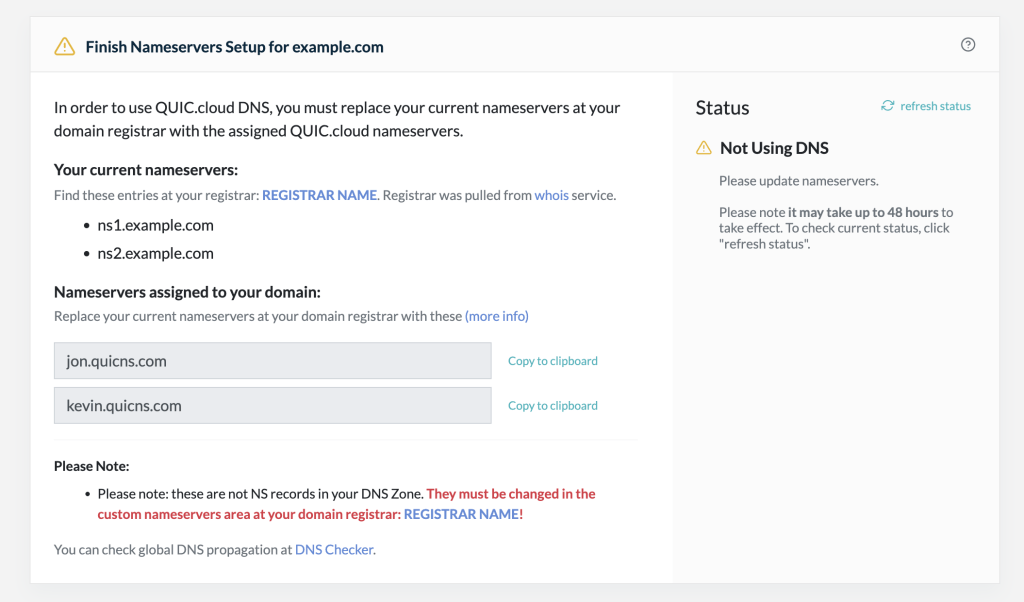
Once your DNS records have been imported into QUIC.cloud, you will need to instruct your domain registrar where to find your DNS records.
-
Visit your QUIC.cloud DNS Zone and locate the two nameservers listed under Nameservers assigned to your domain. These are the new nameservers that you will need to save with your domain registrar.
Note
Your domain registrar is the provider from which you purchased your domain name. Sometimes this is the same as your hosting provider, but that is not always the case. If QUIC.cloud can detect your domain registrar, it will be displayed on this page, so you can be sure you are logging in to the correct place to make your changes.
-
Log in to your domain registrar. Your previous DNS provider's nameservers should still be on file. You’ll see them listed under
NS1,NS2, and possiblyNS3andNS4as well.If your domain is registered with one of these providers, click the appropriate link below for instructions on adding custom nameservers:
If your registrar is not listed above, look for the area of its site that lets you manage nameservers. It may be called DNS Zone, Manage DNS, or something similar.
-
Change the
NS1andNS2records to match those displayed in your QUIC.cloud DNS Zone. If your domain registrar has additional records (NS3,NS4, etc.), erase those values. You should now have only QUIC.cloud-provided NS records at your domain registrar.
Turn off DNSSEC
Please verify that DNSSEC is disabled at your domain registrar. QUIC.cloud does not support DNSSEC at this time.
If you keep DNSSEC enabled at your domain registrar while using QUIC.cloud nameservers, it may result in downtime for your domain.
Verify
- Once you’ve updated your domain registrar, return to your QUIC.cloud DNS Zone and click Refresh Status.
- Check your domain’s DNS status with a tool such as DNSChecker.org. DNS caching typically causes delays. If your DNS has not propagated after 24 hours, please open a support ticket, and we’ll look into it.
Frequently Asked Questions
Will my site experience downtime when I switch?
It depends.
If you are already actively using the CDN and have copied over the DNS records without changing any of their values, then the DNS change should not cause any downtime.
If you have not yet enabled the CDN or have changed some of your DNS records, we recommend waiting until the changes are fully migrated before enabling the CDN.
For some big sites, there is a 10–15-minute window during which DNS verification is happening and the Let's Encrypt SSL certificate is being generated. During that time, your site could be without an SSL certificate. You can avoid this gap in coverage by uploading a valid certificate manually before you enable the CDN. Then, you can freely switch to the SSL Certificate setting’s System-Generated value for future renewals.
What do I do if I need to update my DNS after switching?
When you switch to QUIC.cloud DNS, any future additions or edits to DNS records (for example, creating or modifying MX records for a new email provider) will be made through the QUIC.cloud DNS Zones interface. You will no longer update DNS records with your hosting provider as before.
Can I switch back to my hosting provider for DNS?
Yes. If you stop using QUIC.cloud CDN, or have another reason to change DNS providers, you may do so at any time. You are not locked into QUIC.cloud DNS.