Online Services Pricing
Note
NEW: Simplified billing coming December 1, 2026! The current pricing is valid until November 30, 2026. Learn more.
Here's what you need to know about quota and credit in the simplest possible terms:
- QUIC.cloud services are paid for using quota.
- You can purchase quota using your account-level credit.
- To add more credit to your account, visit the QUIC.cloud shop.
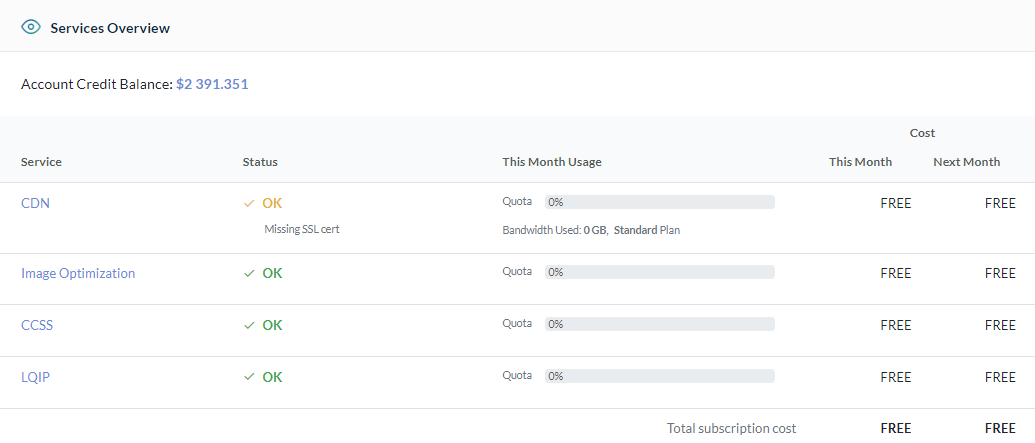
You can see the status of your quota usage and credit balance on the Summary screen of your dashboard.
Tip
Use quota for QUIC.cloud's WordPress Services and bandwidth for the QUIC.cloud CDN. To learn more about bandwidth, see CDN Plans and Pricing. To learn more about quota, stay right here and read on.
Quota
Your domain can use the following WordPress Optimization Services provided by QUIC.cloud, as long as you have quota available:
- Image Optimization
- Page Optimization (this includes Critical CSS, Unique CSS, and Viewport Images services)
- Low-Quality Image Placeholder Generation
Quota is a measurement of usage and usually refers to a number of requests or calculations. It is counted at the domain level.
Credit
Credit is an account-level currency and may be applied to the acquisition of additional quota for any service and any domain managed by the account.
Your credit balance rolls over at the end of the month. Purchased credit never expires.
You can purchase credit in the QUIC.cloud store.
Once you have a credit balance, you can use it to purchase one-off Pay-As-You-Go quota boosts or subscribe to additional monthly quota for certain services.
Frequently Asked Questions
Can I transfer quota from one service to another?
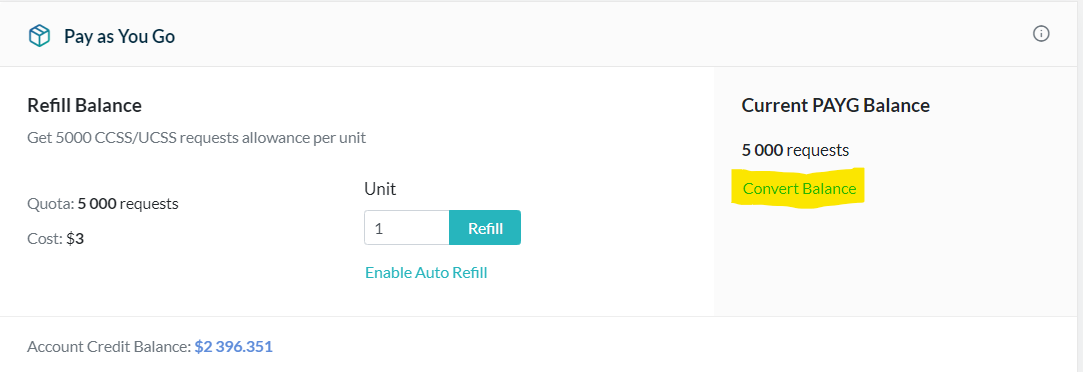
Any quota that you previously added to a service via Pay-As-You-Go may be converted to dollars and transferred back to your account balance. Look for the Convert Balance link in the Pay-As-You-Go area, as seen in the screenshot above. Click the link to remove the credit from the service and add it back to your account balance. Once the credit is back in the account balance, it may be reallocated to another service. If your domain is linked to a QUIC.cloud Partner Account that uses credit, you will have the option to transfer the credit to your partner balance instead.
Can I transfer quota from one domain to another?
As mentioned earlier, you can convert and transfer any pay-as-you-go quota back to the account balance or partner balance via the Convert Balance link. Once converted, you may reallocate the credit to another domain under the same account.
If you find yourself doing this often, you might want to consider this strategy for managing your credit so that transfers between domains are not necessary.
If I don't use all of my credit balance, does it roll over?
Yes! Credit is purchased in our store and is yours to keep. It never expires, and the balance rolls over from month to month.